


Reset your CMOS
Sometimes, when you are experiencing issues with your computer after adding new hardware, removing hardware, or otherwise making hardware changes - your system might become unresponsive. Indications of this unresponsive behavior include:
- No boot screen after BIOS / POST screen displays - (e.g. not booting)
- No POST screen at all
- Weird beep noises coming from computer, but no display
These kinds of behaviors are general indications of a hardware problem with your computer, or settings not correctly configured. The quick fix, although not the first fix, is to reset your CMOS to default settings.
To do this, you need the following:
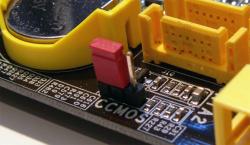
Locate the jumper on your motherboard which indicates CMOS Reset or CMOS Clear. Typically, you can find this jumper near the battery. See image shown so you have a better idea of what you are looking for.
With the computer OFF, set this jumper so that it connects the two pins, completing the circuit. This will reset your CMOS settings to factory default. After placing the jumper, leave it connected for a couple seconds, then pull it off so that it no longer is connected. You may now power back on your computer. If you were successful, you should get an error message that the CMOS settings were not found, and to enter the BIOS to setup the correct settings.